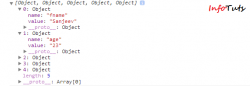
Previously I have written tutorials on Insert data using jQuery and PHP without refreshing the page. In that tutorial we were submitting form by creating data string and then sending it to PHP using $.post. So just consider if you have large number of fields in your form then it would be difficult plus more error prone to create a data string. So in case of long forms we must avoid creating data strings (name value pair) manually. In this tutorial we will use .serializeArray() method to create an array of names and values.
Few points to be noted about .serializeArray() method:
1) It does not return JSON, it gives you array of objects which can be easily converted to JSON.
2) In your form fields name attribute must be there.
In this example I will simply use .serializeArray() to serialize my forms data then send it to server using Ajax. Once you receive all the data you can process it the way you want.
You can see serialized data as array of objects in console:

[button_round color=”orange” url=”infotuts.com/demo/ajax-form-post-jquery/download.html”] DOWNLOAD [/button_round] [button_round color=”orange” url=”infotuts.com/demo/ajax-form-post-jquery/”] LIVE DEMO [/button_round]
We have a simple HTML form:
</p>
<form id="myform" type="post">
 <fieldset>
 <legend>Ajax Form </legend>
 <p>We would love to hear from you. Please fill out this form</p>
 <div class="elements">
 <label for="name">Name :</label>
 <input required="required" type="text" value="Sanjeev" name="fname" size="20" />
 </div>
 <div class="elements">
 <label for="Age">Age :</label>
 <input required="required" type="number" value="23" id="age" name="age" size="10" />
 </div>
 <div class="elements">
 <label for="pro"> Profession :</label>
 <select name="pro">
 <option value="Student" selected="selected">Student</option>
 <option value="Engineer" >Engineer</option>
 </select>
 </div>
 <div class="elements">
 <label for="Gender">Gender: </label>
 <input type="radio" name="gender" value="Male" checked="checked" id="r1"> Male </input>
 <input type="radio" name="gender" value="Female" id="r2"> Female </input>
</div>
 <div class="elements">
 <label for="hobby">Hobby :</label>
 <input type="checkbox" name="hobby[]" value="Sports" id="ch1"> Sports </input>
 <input type="checkbox" name="hobby[]" value="Coding" checked="checked" id="ch2"> Coding </input>
 </div>
 <div class="submit">
 <input type="submit" id="btn" name="btn" class="btn" value="Submit" />
 </div>
 </fieldset>
</form>
<p style="text-align: justify;">
Our jQuery Code:
</p>
$(document).ready(function() {
 $("#msg").hide();
 $("#btn").click(function(e){
 var Data = $("#myform").serializeArray();
 console.log(Data);
 $.ajax(
 {
 url : "action.php",
 type: "POST",
 data : Data,
 success:function(data, textStatus, jqXHR)
 {
$('#msg').html(data);
 }
 });
 $("#msg").slideDown("slow");
 e.preventDefault();
});
});
<p style="text-align: justify;">
Above jQuery code simply uses .serializeArray() method to create array of object (name value pair). We use PHP to recieve all the form values and then we can process it the way we want.
Below is our simple PHP Code:
</p>
<?php
if (!empty($_POST))
{
 $name = $_POST['fname'];
 echo "Welcome <b>". $name. "</b>";
 $age = $_POST['age'];
 echo "<br />Your age is: <b>". $age. "</b>";
 $sex = $_POST['gender'];
 echo "<br />Your gender is: <b>". $sex. "</b>";
 $pro = $_POST['pro'];
 echo "<br/> You are : <b>".$pro. "</b>";
 if(isset($_POST['hobby'])){
 echo "<br/> You Love: ";
 foreach($_POST['hobby'] as $hobby){
 echo "<b>".$hobby. " </b>";
 }
}
}
?>
<p style="text-align: justify;">
Share this simple but useful tutorial with your friends and followers 🙂
Comments
9 responses to “Submit Form with jQuery Ajax”
Sanjeev
Good article.. again. I have never heard of .serializeArray() before, I use .serialize(). It is used the same way. var Data = $(“#myform”).serialize(); but it creates a query string and can be processed the same way on the server.
After testing both I prefer .serialize() mainly as it is easier to troubleshoot as a simple console is readable..
Name=Sam&Age=32&Profession=Student&Gender=Male…
So my question is.. What would be the benefit of using .serializeArray() and/or .serialize() ?
Thanks
Wayne
Hi Wayne,
Its great to see your comment again. Yes people are confused on when to use serializeArray() and when to go with serialize(). I think http://stackoverflow.com/questions/10430502/whats-the-difference-between-serialize-and-serializearray is an explanation that can help you. Further what I think serializeArray sends array of objects so during processing (at server end)you can process it as array (using aaray operations). eg looping through objects etc.
Thanks:
Sanjeev
nice….tutorial
Thanks Rajendra 🙂
Hi Sanjeev,
Thanx for sharing this Nice Tutorial.
Hello Ajaypal
You are welcome to InfoTuts 🙂
[…] and some use jQuery’s API methods .serialize() and .serializeArray(). Our last tutorial shows how to use serializeArray() method to send array of objects to server via Ajax. Now taking it further what if I’d want to send JSON data to server, in this post I will be doing […]
Hi,
var Data = $(“#myform”).serializeArray(); this code will not work if we are sending files using ajax. How to send both data and files using ajax??
Thanks in advance
How to searching data using php ajax..?