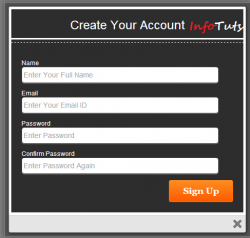
To Increase number of registrations/signups in your website you can use popups as registration form. Yes pop ups fetch visitors attention easily so if you have a really cool signup form then visitor may want to register to see what services you are offering. I started looking for attractive lightbox signup form but found very few. So I thought to create one. I started looking for some cool designs and found one at legend themes. Its cleanly built with html5 and css3 so I thought it to share with you guys. The signup/registration form is really cool so I thought of using it in lightbox style. I used colorbox.js jquery plugin to achieve this. So finally I added two lines of code and my job was done.
Yes colorbox is a powerful jQuery plugin to create awesome custom styled modals. Let start our simple tutorial.

[button_round color=”blue” url=”infotuts.com/demo/lightbox-signup-form/”] Live Demo [/button_round] [button_round color=”blue” url=”infotuts.com/demo/lightbox-signup-form/download.html”] Download [/button_round]
All I had to do is to call colorbox plugin and pass it suitable ID. I added this one line code:
</p>
jQuery(document).ready(function(){
 $.colorbox({width:"480px", inline:true, href:"#register"});
});
 </script>
HTML markup code:
<html></p>
<body>
<div style='display:none'>
<div id="register">
 <h2>Create Your Account </h2>
<form id="SignUpForm" action="" method="post">
 <fieldset>
 <p>
 <label for="name">Name</label>
 <input id="name" type="text" placeholder="Enter Your Full Name" onfocus="this.placeholder = ''" onblur="this.placeholder = 'Enter Your Full Name'" class="ipt" value="" />
 </p>
 <p>
 <label for="email">Email</label>
 <input id="email" type="email" class="ipt" placeholder="Enter Your Email ID" onfocus="this.placeholder = ''" onblur="this.placeholder = 'Enter Your Email ID'" value="" />
 </p>
 <p>
 <label for="password">Password</label>
 <input id="password" class="ipt" placeholder="Enter Password" onfocus="this.placeholder = ''" onblur="this.placeholder = 'Enter Password'" type="password" />
 </p>
 <p>
 <label for="Con-password">Confirm Password</label>
 <input id="con-password" class="ipt" placeholder="Enter Password Again" onfocus="this.placeholder = ''" onblur="this.placeholder = 'Enter Password Again'" type="password" />
 </p>
 <p>
 <button type="submit" class="signup" >Sign Up</button>
 </p>
 </fieldset>
</form>
</div>
</div>
</body>
</html>
You can easily connect it with database and start getting more user registrations with this awesome popup box. I will soon post a complete working lightbox with user sign in and sign up options. You will surely love it.
Comments
2 responses to “Create Attractive Lightbox Sign Up Form”
Thank you ! Blessings
hi i am looking for the same tutorial but i want to open a form using anchor reference
actually i have a profile list page in that i am displaying all the images if a person clicks on one image and his details should be opened in child form for that i want to use lightbox or fancybox please help me.