
Hey geeks, usually we see default bullet list points when creating content using the default WordPress block Editor and it doesn’t look good with the content style and you want to replace/change it with some images or graphics.
In this tutorial I will show you step by step to replace the default bullet with images:
Replace the default Bullet with images
To add images in place of bullet list point you need to follow the below steps :
A) Add a class name for those bullets list( Custom CLASS)
B) Upload your own bullet image in the media library
C) Add custom CSS to replace the default bullet list point with your uploaded Image
Let’s see how to do it….
A) Adding a custom Class in the Bullet list
- Go to WP-admin > Post/pages where you have added the bullets.
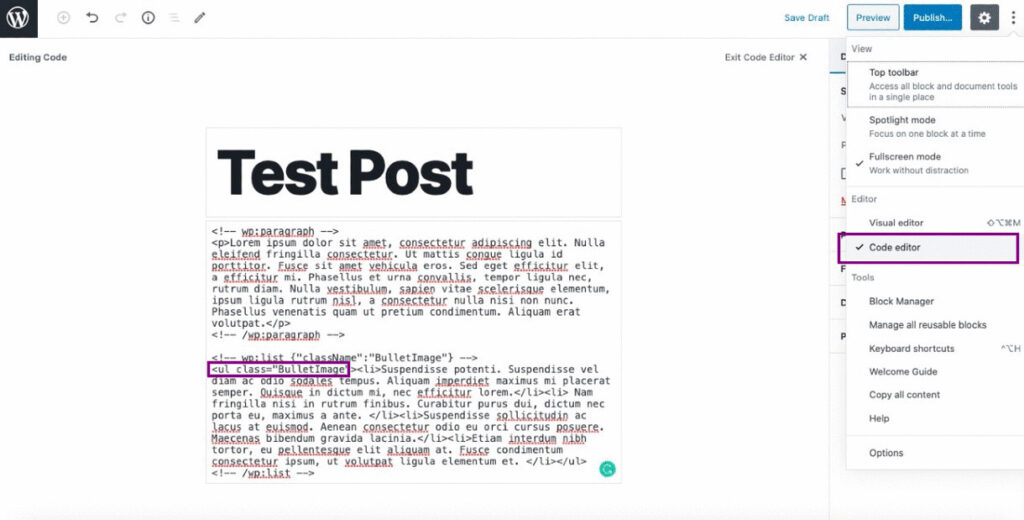
- Then enable the Code editor under Editor settings and check the ‘Code Editor’ option.
- After that, add a custom Class lets say `BulletImage` ( you can use your own class name ). Please note that, do not use any CSS class name that is already used in the site or predefined earlier. Then click on the update button to update your page. you should see the default Bullet.
B) Upload your own Bullet image in the Media Library
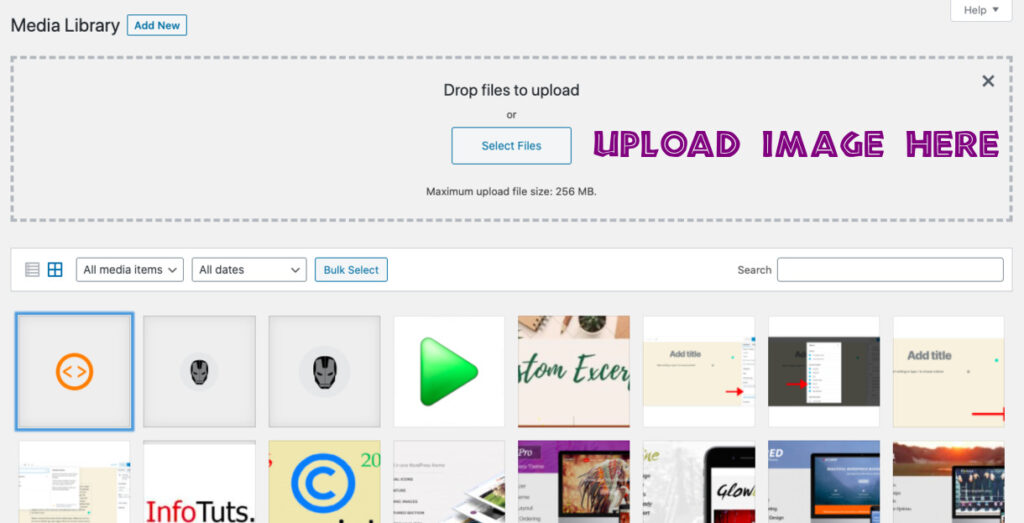
1 Go to Media > Add New and upload the bullet image in the media library
2 Once uploaded go to Media > library and click on the bullet image it will open in a Lightbox, copy the link URL from their.
C) Add custom CSS to replace the Bullet list point with the Uploaded Image
To replace the default bullet list point you need to add the below custom CSS code in the theme’s style-sheet under Appearance > customizer> Additional CSS
ul.BulletImage li {
list-style-image:url('https://infotuts.com/wp-content/uploads/2020/05/Bullet3.ppg');
}
It should look like this..

You can download the custom images/icons from iconfinder
I hope the above article will help, if you have any further queries please drop your comments below: