
Sometimes titles are not that effective to grab the viewer’s attention, In that case, viewers go through with the summary which we call excerpts to read about the quality of the content. By default, the default length of excerpts provided by WordPress for excerpts is 55 words, which may not be sufficient. In this post, we are going to learn how to change excerpt lengths by using various methods.
Changing post excerpt length by using Read More block
You can use the more block. Edit the post and place the cursor where you want the add the excerpt and click on the + sign to add a new block and search for the `more block` and add it.

Note: If you are still using the previous classic editor the more block is not available instead you need to use the ‘Read More’ tag while editing your post.
Changing post excerpt by Enabling Custom Excerpt
If you are not happy with the automatically generated post excerpt, It’s the easiest way to add your own custom description while creating your post.
– Go to the Editor Settings by clicking on the 3 dots on the right side of the page
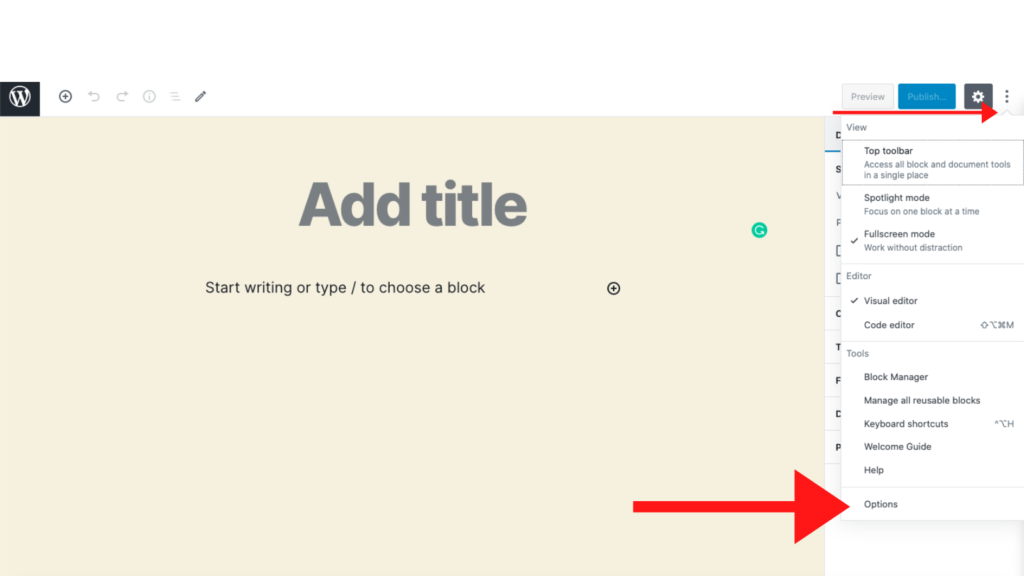
– Click on the options field and enable excerpt option

– After enabling the excerpt there is a new field ‘excerpt’ added on the right side of the screen. Now enter the custom excerpt with your desired length.

Changing excerpt length by Using filters
Changing the length with the above method will surely take more time and it’s hard to customize the excerpt length for each and every blog post manually. For this, you can try changing the default excerpt length using filters.
To change the excerpt length add the below code in function.php file:
function custom_excerpt_length( $length ) {
	return 20;
}
add_filter( 'excerpt_length', 'custom_excerpt_length', 999 );
The first function where it specifies ‘return 20’ is to change the excerpt length to 20 words. You may change the ‘return’ value to any number as you like.
— custom_excerpt_length is the function name here
— $length is a variable
— excerpt_length is a filter
— 999 here is the priority
Note that: It is not recommended to update the core files of the theme as when you upgrade the theme to a new version all the modification has done so far would be lost. To avoid such mishap you need to create a child theme using these instructions
Changing post excerpt by using plugin
If you are not interested in tweaking around the code, you can try using this free plugin Advanced Excerpt free plugin, it will enable you to add excerpt using either character count or word count.
I hope this article may finds your way to limit out the except length. If you have any queries please drop your comments below.